Sending email using sendgrid's API and
node.js
Overview
In this tutorial, we will learn how we can send email using sendgrid's API and node.js .
Prerequisites
Sendgrid
As per wikipedia :
SendGrid provides a cloud-based email delivery service that assists businesses with email delivery. The service manages various types of email including shipping notifications, friend requests, sign-up confirmations, and email newsletters. It also handles internet service provider (ISP) monitoring, domain keys, sender policy framework (SPF), and feedback loops. Additionally, the company provides link tracking, open rate reporting.It also allows companies to track email opens, unsubscribes, bounces, and spam reports.Click here to create an account on sendgrid and after that follow the instructions given below :
-
We are selecting
try for freeoption for this tutorial as shown below :
-
Now input the required details which includes :
-
Username: This needs to be unique. -
Password: Enter a secure alphanumeric password here. -
Confirm password: Enter the password again to confirm it. -
Email: Enter a valid email address here which you want to link with your sendgrid account.
-
-
Your account is created Now input details about you in order to proceed. We've marked the details we entered while creating
this tutorial in the image given below :
-
Congratulations! you have successfully created account on sendgrid.
Now move to the guides section to create your first application. You can click on the guides provided in the
help linkgiven on the bottom right corner of dashboard as shown below or you can simply click here .
-
Now click on the
startlink provided in front of " Integrate using our Web API or SMTP relay " as shown below :
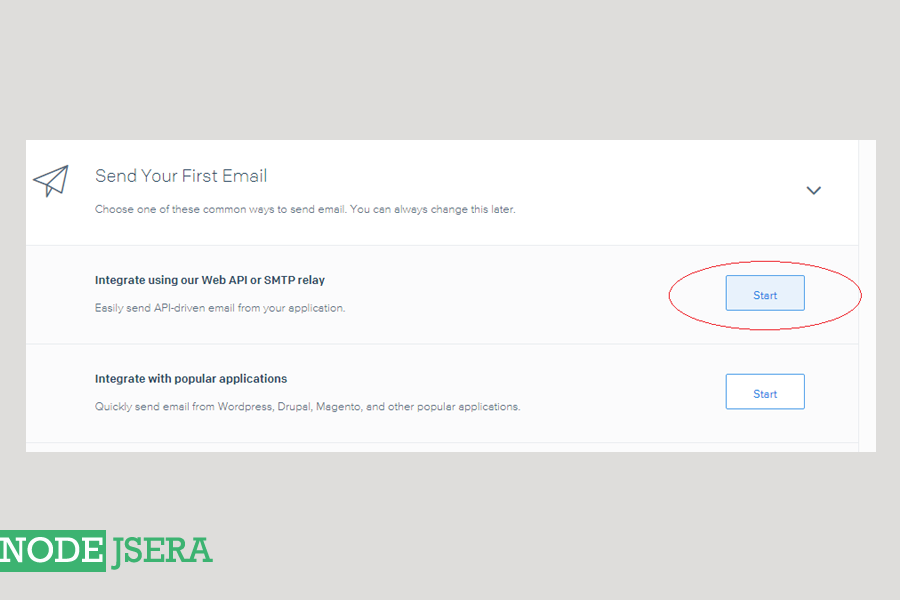
-
Now we need to choose the setup method. We are using
Web APImethod for our tutorial which , as per sendgrid , is fastest and most flexible way to send email using languages like Node.js, Ruby, C#, and more.
-
Choose
node.jsas the language you want to use as shown below : -
Now we need an
APIkey. We can create anAPIby adding some random content as the name of the API key and clicking on thecreate API keybutton as shown below: -
Now you need to update development environment with
SENDGRID_API_KEYby running the following commands in your shell :
echo "export SENDGRID_API_KEY='YOUR_API_KEY'" > sendgrid.env
echo "sendgrid.env" >> .gitignore
source ./sendgrid.env
The screenshot of the following is given here :
-
Install the sendgrid NPM package with the following command :
npm install --save @sendgrid/mail
-
Now copy the minimum code required to send an email as shown below :
You can copy it from here in aemail.jsfile :
//Name of the file : email.js
// using SendGrid's v3 Node.js Library
// https://github.com/sendgrid/sendgrid-nodejs
const sgMail = require('@sendgrid/mail');
sgMail.setApiKey(process.env.SENDGRID_API_KEY);
const msg = {
  to: '[email protected]',					//receiver's email
  from: '[email protected]',			//sender's email
  subject: 'I think its working',				//Subject
  text: 'and finally  i can send email from sendgrid',		//content
  html: 'and easy to do anywhere, even with Node.js',			//HTML content
};
sgMail.send(msg);
you can run it using the following command :
>node email.js
And if it runs without any error you can click on theI've integrated the code abovecheck box and click onverificationbutton and sendgrid will check whether your mail came through or not.
Summary
We learned how we can send a mail using sendgrid.